
Google Shopping campaigns are the framework used to organise and manage your Shopping ads in Google Ads. While the terms are often used interchangeably, there’s an important distinction:
-
Shopping ads are the individual product ads users see across Google, built from product groups containing one or more SKUs.
-
Shopping campaigns are where these ads live, allowing you to manage bidding, targeting, and organisation.
Shopping campaigns are country-specific. If you sell in multiple regions, you’ll need a separate campaign for each sales country.
How Do Shopping Campaigns Work?
To start using Shopping campaigns:
-
Upload your inventory and product data (titles, images, pricing, availability, etc.) to Google Merchant Center.
-
Create a Shopping campaign in Google Ads.
Google uses your product data to match searches with the most relevant ads. Your Shopping ads can appear on:
-
The Google Shopping tab
-
The Shopping carousel at the top of search results
-
Google partner websites
Because Shopping campaigns rely on your product feed rather than keywords alone, high-quality, accurate product data is crucial for success.
Why Use Shopping Campaigns?
Shopping campaigns give you:
-
Control – decide which products to promote and how much to bid
-
Organisation – segment products into groups for easier management
-
Optimisation – track performance and refine campaigns for better results
Tip for beginners: Start with a small selection of high-margin products. This lets you learn how campaigns perform before scaling up.
Shopping Ads vs Text Ads
It helps to understand the difference:
-
Shopping ads display a product image, title, price, and often other details.
-
Text ads rely on keywords you select.
Shopping ads don’t allow you to choose which keywords trigger your ads; instead, you manage performance using negative keywords. That said, it’s still vital to keep your product titles keyword-rich to increase relevance.
Example of a Google Shopping ad: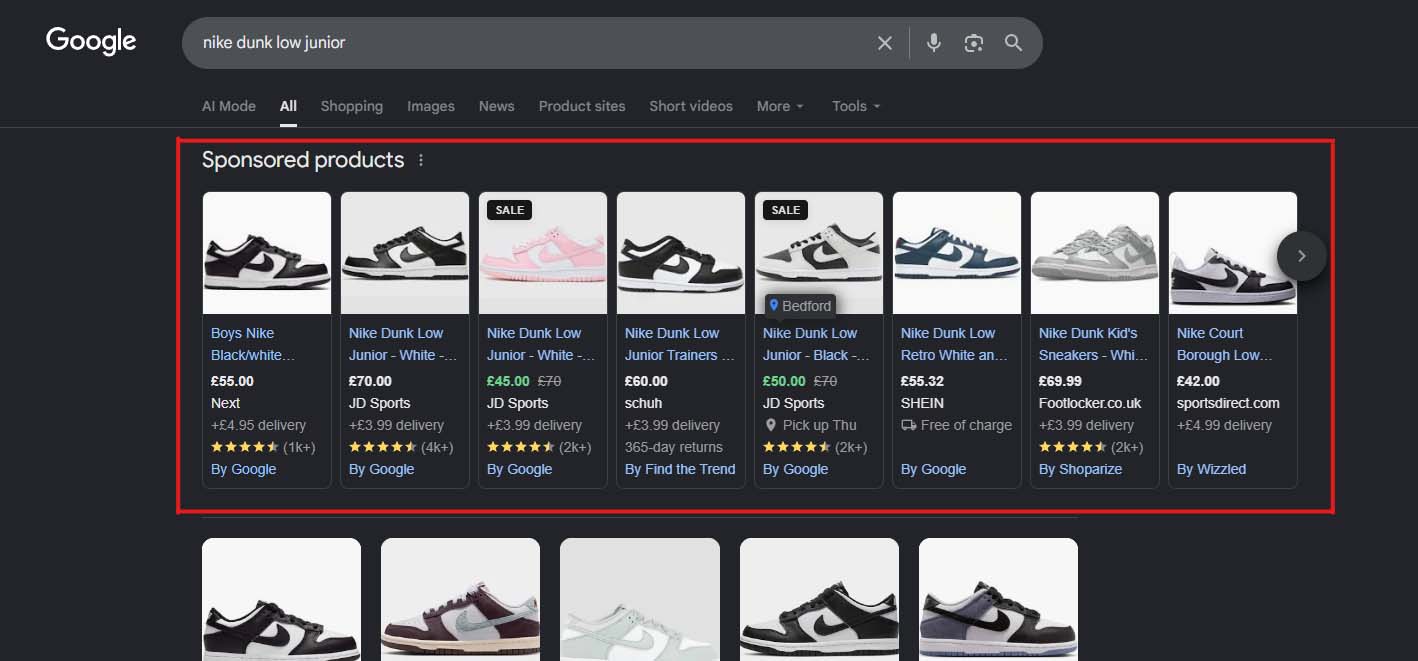
How Much Does It Cost to Use Google Shopping Campaigns?
Google Shopping ads use a cost-per-click (CPC) model:
-
You place a bid to enter the ad auction.
-
You are only charged when someone clicks your ad.
Even if the user immediately returns to the search results, the click counts, and you pay. This means your focus should be on attracting the most relevant traffic—shoppers who are actively searching for your exact product and have high purchase intent.
Pro Tips for Running Successful Google Shopping Campaigns
-
Keep Your Feed Fresh – Update prices, availability, and product descriptions regularly to avoid disapproved ads or wasted spend.
-
Segment Smartly – Group products by category, margin, or performance to make bidding and optimisation easier.
-
Leverage Negative Keywords – Exclude irrelevant searches to prevent wasting clicks on shoppers unlikely to convert.
-
Focus on High-Quality Images – Clear, professional photos can significantly increase click-through rates.
-
Monitor Search Terms – Regularly review which searches trigger your ads and refine product titles for better relevance.
-
Test Bids and Budgets – Start small, measure performance, then scale campaigns on your best-performing products.
-
Use Performance Data – Track conversion rates, ROAS (return on ad spend), and CPC trends to optimise campaigns continually.
Ready to Boost Your Sales with Google Shopping?
Google Shopping campaigns are a powerful way to put your products in front of high-intent shoppers at the exact moment they’re ready to buy. With the right setup, product feed, and strategy, you can increase visibility, drive more qualified traffic, and grow your online revenue.
If you’re looking for guidance or want to make the most of your Shopping campaigns, our team is here to help. From campaign setup to optimisation strategies, we can ensure your products stand out and reach the right customers.
Start turning clicks into customers today!